Variables and Types 变量和类型
本文共 2533 字,大约阅读时间需要 8 分钟。
Data types 数据类型
C has several types of variables, but there are a few(一些) basic types:
-
Integers (整型)- whole numbers which can be either positive(正数) or negative(负数)(要么...要么). Defined using
char,int,short,longorlong long. -
Unsigned integers(无符号整型) - whole numbers which can only be positive. Defined using
unsigned char,unsigned int,unsigned short,unsigned longorunsigned long long. -
Floating point numbers(浮点数) - real numbers实数 (numbers with fractions). Defined using
floatanddouble. -
Structures(结构体) - will be explained later, in the Structures section.(稍后将在“结构”一节中解释。)
The different types of variables define their bounds(界限). A char can range(范围) only from -128 to 127, whereas a long can range from -2,147,483,648 to 2,147,483,647 (long and other numeric data types(数字数据类型) may have another range on different computers, for example - from –9,223,372,036,854,775,808 to 9,223,372,036,854,775,807 on 64-bit computer).
Note that C does not have a boolean type(布尔类型). Usually, it is defined using the following notation(符号):
#define BOOL char#define FALSE 0#define TRUE 1
C uses arrays of characters(字符数组) to define strings(字符串), and will be explained in the Strings section.
Defining variables 定义变量
For numbers(数字), we will usually use the type int, which an integer in the size of a "word"(字)the default number size of the machine which your program is compiled on. On most computers today, it is a 32-bit number, which means the number can range from -2,147,483,648 to 2,147,483,647.
To define the variables foo and bar, we need to use the following syntax(语法):
int foo;int bar = 1;
The variable foo can be used, but since we did not initialize(初始化) it, we don't know what's in it. The variable bar contains(包含) the number 1.
Now, we can do some math. Assuming(假设) a, b, c, d, and e are variables, we can simply use plus, minus and multiplication(乘法) operators in the following notation, and assign(分配,赋值) a new value to a:
int a = 0, b = 1, c = 2, d = 3, e = 4;a = b - c + d * e;printf("%d", a); /* will print 1-2+3*4 = 11 */ Exercise
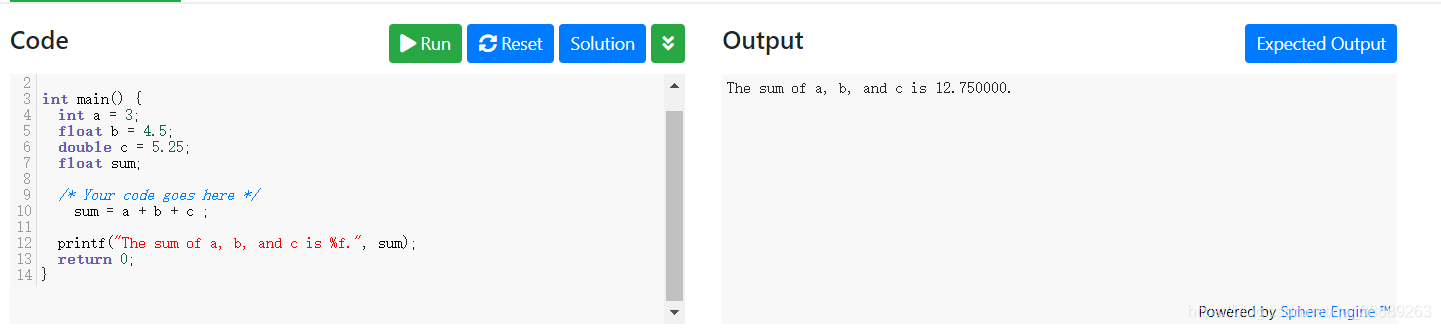
In the next exercise, you will need to create a program which prints out the sum of the numbers a, b, and c.
原:
#includeint main() { int a = 3; float b = 4.5; double c = 5.25; float sum; /* Your code goes here */ printf("The sum of a, b, and c is %f.", sum); return 0;}
改:
#includeint main() { int a = 3; float b = 4.5; double c = 5.25; float sum; /* Your code goes here */ sum = a + b + c ; printf("The sum of a, b, and c is %f.", sum); return 0;}
转载地址:http://fnii.baihongyu.com/
你可能感兴趣的文章
node, nvm, npm,pnpm,以前简单的前端环境为什么越来越复杂
查看>>
Node-RED中Button按钮组件和TextInput文字输入组件的使用
查看>>
vue3+Ts 项目打包时报错 ‘reactive‘is declared but its value is never read.及解决方法
查看>>
Node-RED中Slider滑杆和Numeric数值输入组件的使用
查看>>
Node-RED中Switch开关和Dropdown选择组件的使用
查看>>
Node-RED中使用exec节点实现调用外部exe程序
查看>>
Node-RED中使用function函式节点实现数值计算(相加计算)
查看>>
Node-RED中使用html节点爬取HTML网页资料之爬取Node-RED的最新版本
查看>>
Node-RED中使用JSON数据建立web网站
查看>>
Node-RED中使用json节点解析JSON数据
查看>>
Node-RED中使用node-random节点来实现随机数在折线图中显示
查看>>
Node-RED中使用node-red-browser-utils节点实现选择Windows操作系统中的文件并实现图片预览
查看>>
Node-RED中使用node-red-contrib-image-output节点实现图片预览
查看>>
Node-RED中使用node-red-node-ui-iframe节点实现内嵌iframe访问其他网站的效果
查看>>
Node-RED中使用Notification元件显示警告讯息框(温度过高提示)
查看>>
Node-RED中使用range范围节点实现从一个范围对应至另一个范围
查看>>
Node-RED中实现HTML表单提交和获取提交的内容
查看>>